
File Leak Search
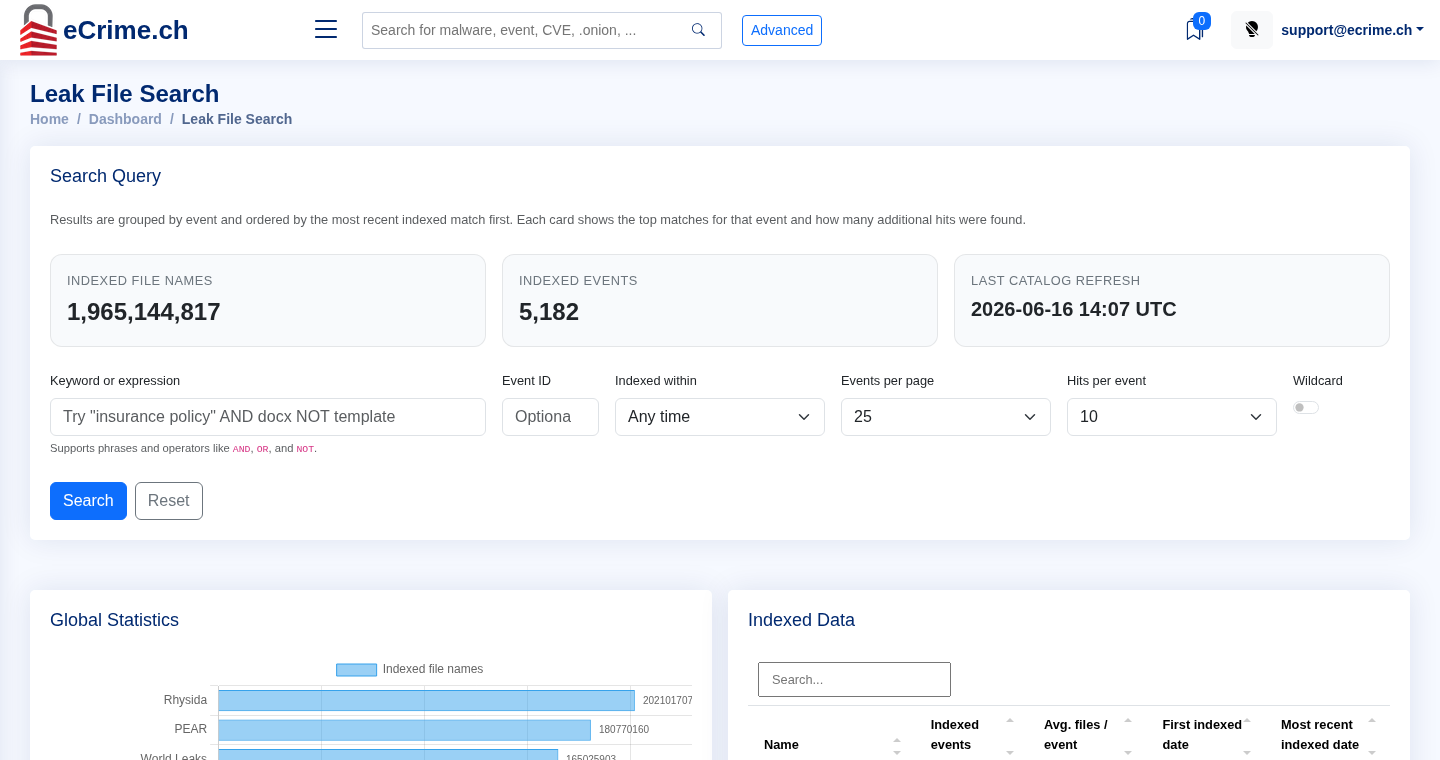
File Leak Search searches indexed file names and file-list metadata gathered from leak publications and downloadable file indexes.
What It Is For
Section titled “What It Is For”Use File Leak Search when you need to check whether a leaked file listing references a:
- company or brand name
- domain
- email address
- project name
- customer, supplier, or internal code word
- file extension or path fragment
Results are grouped by event so you can see which leak publication contains the match before opening the underlying event.
Search Fields
Section titled “Search Fields”- Keyword or expression accepts simple terms, quoted phrases, and Boolean operators such as
AND,OR, andNOT. - Event ID limits the search to one known event. This is useful when you already know the relevant victim or leak publication.
- Indexed within filters by when the file-list entry was indexed.
- Events per page controls how many event groups are shown.
- Hits per event controls how many matching file lines are shown for each event group.
- Wildcard enables broader wildcard matching. Use it when exact terms are too restrictive, but expect wider results.
Practical Examples
Section titled “Practical Examples”"insurance policy" AND docx NOT templateFind document names containing an exact phrase and a file type, while excluding template files.
example.com OR "@example.com"Find domain and email-address style references for the same organization.
confidential AND xlsxFind spreadsheet names that may need closer review.
Download Links
Section titled “Download Links”Where available, event file lists can be downloaded through short-lived links. Treat those links as temporary and generate a fresh one when an integration or browser session needs access.